Product walkthrough
From roadside stop to court-ready report — in under 30 minutes
See exactly what your officers see at every step — from running the test in the field to the insights your command team uses to manage enforcement.
Running the test — guided, step by step
The officer opens Evidex on their smartphone at the roadside. The app guides them through the full SFST protocol — instructions to read, yes/no confirmations to capture, and clue indicators to record — all in sequence.
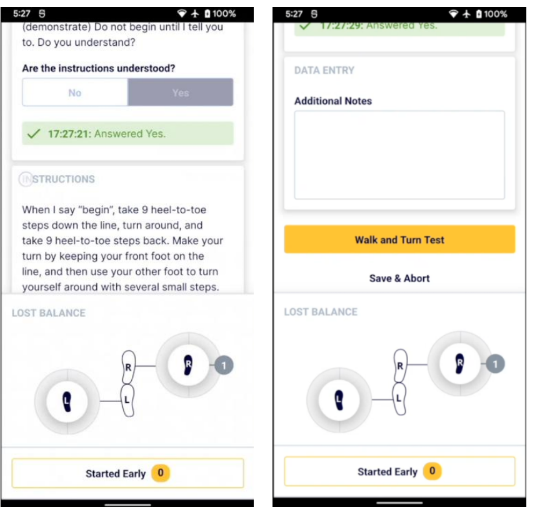
Scripted instructions — nothing left to memory
The exact instruction set for each test appears on screen. The officer reads directly from the app — no variation between officers, no missed steps.
Timestamped subject responses
When the subject answers, the officer taps Yes or No. The app records the exact time — 17:27:21 in this example — creating a verifiable audit trail at the moment it happens.
Visual clue tracker — eyes stay on the subject
The balance and positioning tracker lets the officer record observations with a tap, not a pen. Their attention stays on the subject rather than a clipboard.
What this means for your agency
Every officer — from probationary constable to 20-year veteran — runs the test exactly the same way. Standardized execution means standardized documentation, and documentation that's far harder to challenge in court.
End of stop — the summary is already built
When the test sequence ends, Evidex automatically generates a structured summary of everything captured during the stop. The officer reviews a complete timeline — they don't reconstruct it from notes.
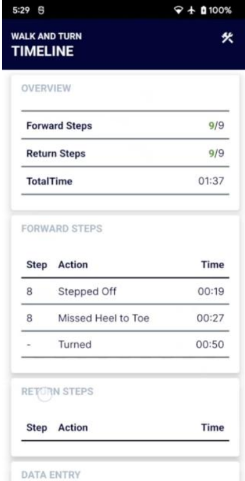
Every step accounted for — automatically
The summary shows forward and return step counts (9/9 in this example), total test time (01:37), and every individual action with its timestamp. Nothing is left to memory.
Clues captured at the moment they happened
Actions like "Stepped Off" at 00:19 and "Missed Heel to Toe" at 00:27 are recorded with exact timing as the test progresses — not recalled 2 hours later at a desk.
Review at the scene or submit later
The officer can review the full summary immediately after the stop while details are fresh, or move on and submit from the web portal back at the station — the data is already saved.
What this means for your agency
The average paper FST report takes 2–3 hours to complete after the stop. With Evidex, the report is substantially built the moment the test ends. Officers get back on patrol faster — and overtime paperwork costs drop significantly.
The structured report — review, confirm, submit
Back at the station, the officer logs into the Evidex web portal. The full case report is pre-populated from the field data — every instruction given, every subject response, every indicator recorded — formatted in a consistent, court-ready structure.
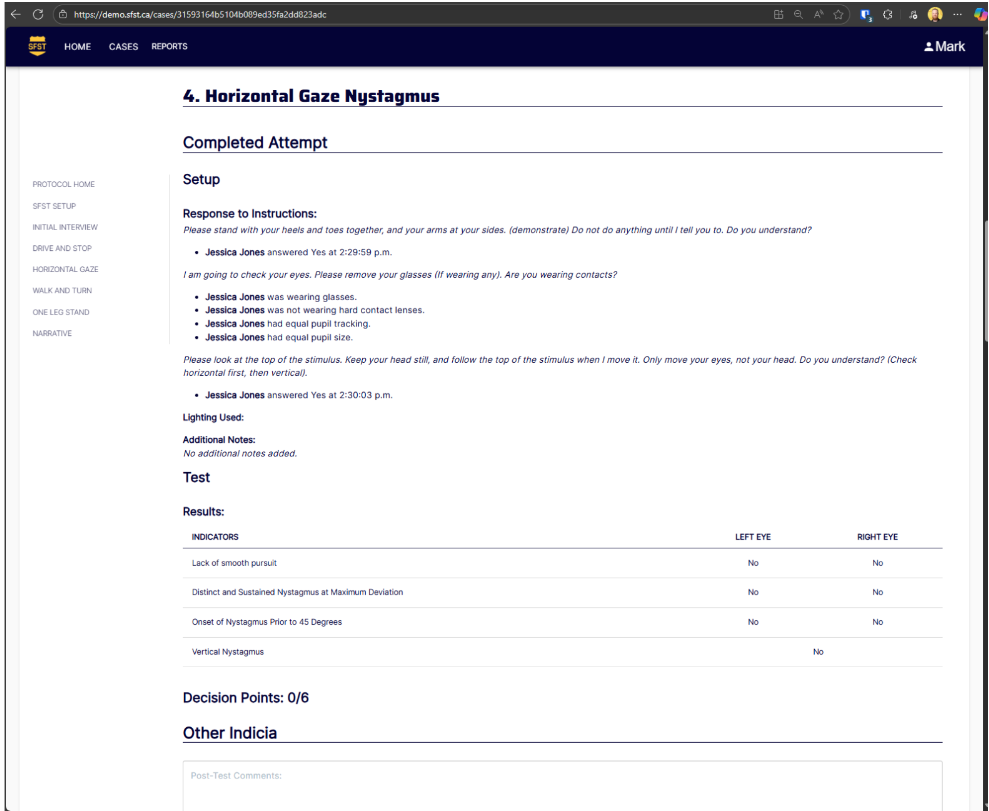
Every instruction and response logged with exact timestamps
The report shows the precise time the subject responded — 2:29:59 p.m. and 2:30:03 p.m. in this example. That level of specificity is available on every single stop, automatically.
Structured indicators table — no interpretation required
Results for each clue (Lack of Smooth Pursuit, Nystagmus at Maximum Deviation, Onset prior to 45 degrees) are recorded in a consistent table format — left eye and right eye, clearly separated. The same layout every time, regardless of which officer ran the test.
Decision points calculated automatically
The app totals decision points from the data captured during the test. The officer reviews, not recalculates — reducing the chance of arithmetic errors under pressure or fatigue.
Left nav shows the full case structure
Each test section — Protocol Home, Initial Interview, Drive and Stop, HGN, Walk and Turn, One Leg Stand, Narrative — has its own structured section in the report. Nothing gets left out.
What this means for your agency
Incomplete or inconsistent documentation is one of the most common reasons impairment charges are withdrawn. A report that looks the same every time, with every field completed, gives your prosecutors far stronger material to work with.
Real-time enforcement intelligence — for the people who manage the budget
Every stop feeds directly into the Evidex command dashboard. Supervisors and chiefs see stop volume over time, arrest outcomes, and geographic distribution — in real time, without waiting for anyone to compile a report.
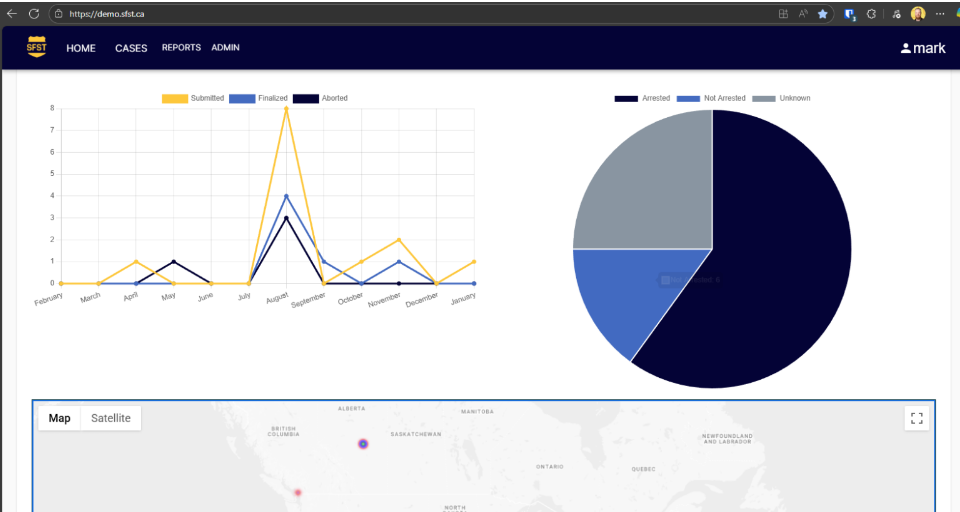
Stop volume trends — month by month
The line chart shows submitted, finalised, and aborted stops across the year. Supervisors can immediately see enforcement patterns, identify low-activity periods, and justify resource deployment with actual data rather than estimates.
Arrest outcome breakdown
The pie chart shows the split between arrested, not arrested, and unknown outcomes. This is the data a chief needs to demonstrate enforcement effectiveness to a police services board — instantly available, not assembled from paper reports.
Geographic stop mapping
Every stop is geo-tagged and plotted on the map. Command can see exactly where impairment enforcement is happening across the jurisdiction — and where coverage gaps exist — enabling data-driven deployment decisions.
What this means for your agency
For the first time, the cost and outcome of every impairment stop is visible in one place. Chiefs can justify DUI enforcement budgets with hard numbers, identify training needs from outcome data, and demonstrate accountability to oversight bodies — all from a single dashboard.
Ready to see this with your agency's data?
Book a 30-minute demo — we'll walk through a live stop from field test to dashboard.